.png?width=450&height=117&name=MavenLogo_Horizontal_WhiteType01%20(1).png)
Overview
Support DOT inspections by providing accurate driver logs on request and helping drivers and inspectors access inspection‑ready records quickly.
Steps for admin/support
-
Open Compliance → Hours of Service
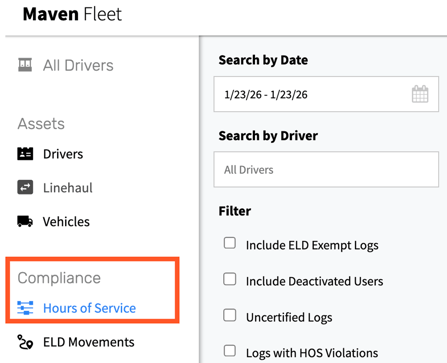
-
Search for the driver and open the daily log for the requested dates.
-
Use export to generate inspection‑ready files in the required format.
-
Follow company policy to deliver the files (for example, download or email).
-
If requested, advise the driver on how to access inspection views or transfer options on the device.
Tips
-
Keep a quick‑access bookmark to the HOS export screen for faster response during inspections.
-
Validate the driver, vehicle, and date range before sharing any records.
-
Confirm that exported logs reflect the latest certified version of the driver’s records.