.png?width=450&height=117&name=MavenLogo_Horizontal_WhiteType01%20(1).png)
Permissions and access
Log editing is restricted to authorized roles:
-
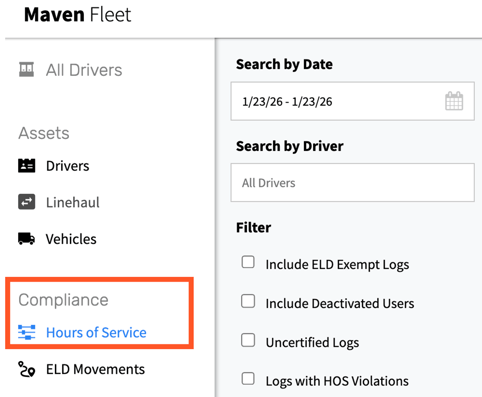
Access to Compliance → Hours of Service
-
A role or permission flag that enables Edit Log.
-
Training on acceptable and prohibited edit scenarios.
Important: All log edits must follow company policy and regulatory rules. The system audit‑logs every change, and the driver must review and accept edits.
When log edits are appropriate
Edits should focus on correcting factual errors, not reshaping history:
Appropriate reasons:
-
Clear mis‑tap (Driving selected instead of On‑Duty while at a dock).
-
Device or hardware issues that created duplicate, missing, or obviously incorrect events.
-
Documented device swap or outage that needs clarification in the log.
Inappropriate reasons:
-
Masking actual non‑compliant driving or duty behavior.
-
Backfilling time to force logs into a compliant state for audits.
How to propose an edit
-
Open Compliance → Hours of Service→ Drivers, search for the driver, and open the Daily Log for the target date.
-
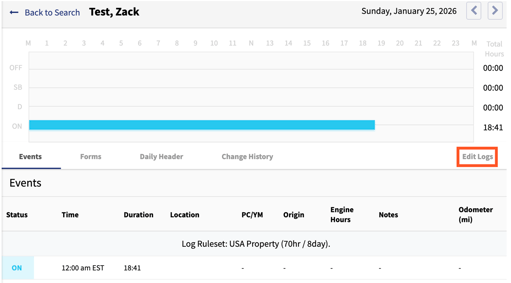
Select Edit Log (if enabled for the user and the day).
-
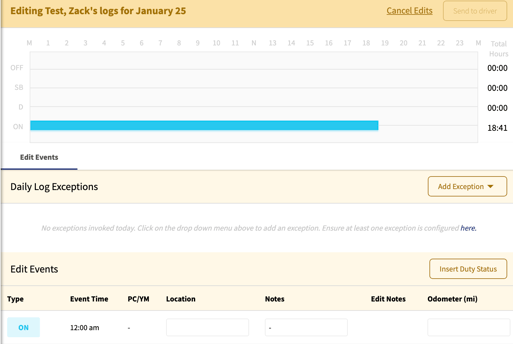
Choose the specific event or time range that needs adjustment. Keep the scope narrow to minimize impact.
-
Set the correct duty status and adjust start/end times and other required fields (location, vehicle, remark) without creating overlaps or gaps.
-
Add a detailed annotation, such as:
-
“Correcting mis‑tap: driver fueling, On‑Duty not Driving, 10:05–10:15.”
-
“ELD replaced at 14:00; driver remained Off‑Duty in terminal.”
-
-
Submit the edit. The system creates a pending edit that appears on the driver’s device.
What happens after submission
-
The driver receives a pending edit request in the Maven app.
-
The driver reviews the change and either:
-
Accepts the edit and certifies the day, or
-
Rejects the edit.
-
-
The audit trail records:
-
Original events and values
-
Proposed changes
-
The admin who submitted the edit
-
The driver’s decision and timestamps
-
tips
-
Make edits minimal and precise—adjust only what is necessary.
-
Treat annotations as part of the official record and write them so an auditor can understand the reasoning.
-
Periodically review edit volume and annotation quality by admin and by terminal.
-
Use edits in combination with coaching; repeated patterns often indicate training or process issues, not one‑off errors.