.png?width=450&height=117&name=MavenLogo_Horizontal_WhiteType01%20(1).png)
Export options
Exports support both real‑time needs (roadside inspections) and periodic reviews (internal audits, external audits, or HR investigations).
Common export options include:
|
Export type |
Description / Use case |
|---|---|
|
Daily log PDF |
Per‑driver, per‑day logs formatted for inspectors and managers |
|
CSV/Excel events and logs |
Detailed event and violation data for analysis or bulk review |
|
Inspection‑ready bundles |
Configured sets of driver logs and summaries for defined date ranges |
Availability and labels can vary slightly by environment, but the workflow is similar.
How to export HOS data from the portal
-
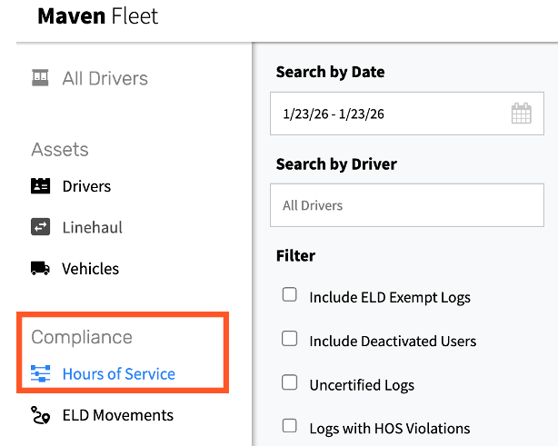
Open Compliance → Hours of Service
-
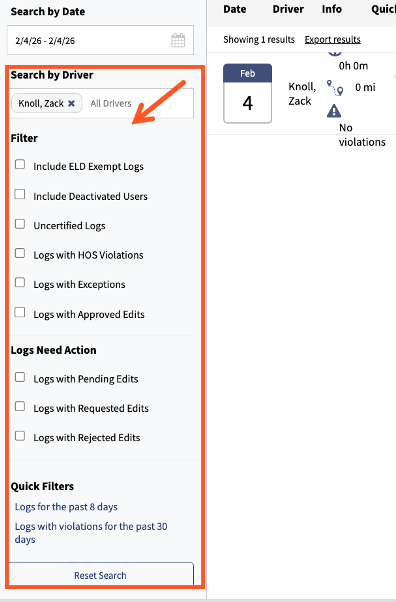
Use filters to narrow the dataset:
-
Driver(s) or driver groups
-
Date range
-
Terminal, group, or tags if available
-
-
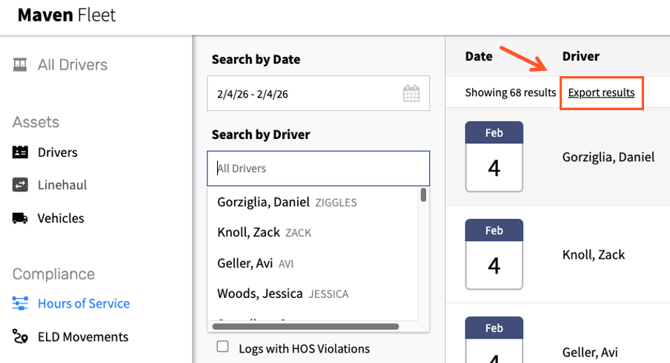
Select Export Results and choose the required format:
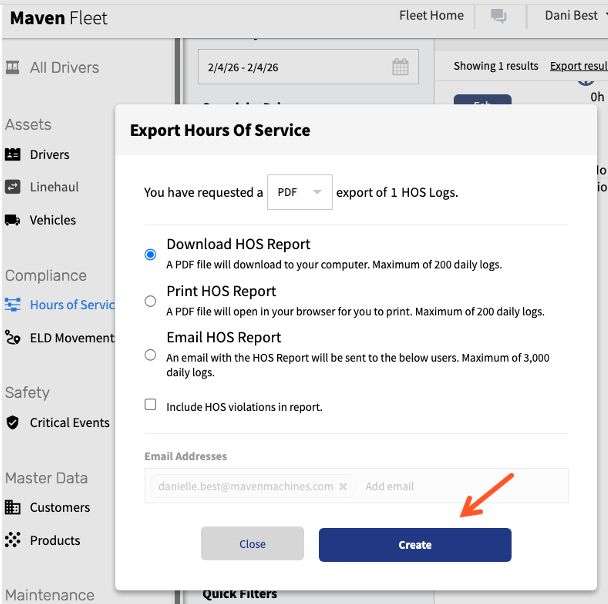
- From Popup Window
- Select export format
- Provide an email address ( If email format is selected
- Click Create
Tips
-
For roadside inspections, export only the requested driver and dates to avoid sending unnecessary information.
-
Maintain a monthly archive of key HOS exports (logs, violation summaries, audit logs) to accelerate future audits.
-
Use CSV/Excel exports to:
-
Identify violation trends by driver or terminal
-
Track time‑to‑certify behavior
-
Review edit volumes and common annotation reasons
-
-
Protect exported files with the same care as any sensitive operational or HR information.