.png?width=450&height=117&name=MavenLogo_Horizontal_WhiteType01%20(1).png)
Where Violations Appear in the Fleet Portal
Violations surface in multiple areas so managers can move from high‑level monitoring to detailed review.
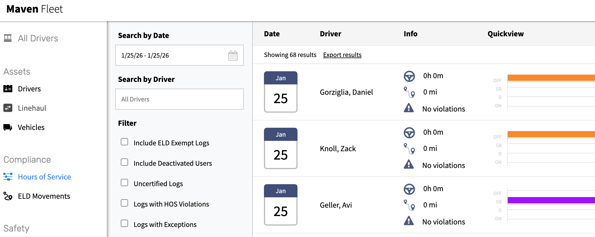
HOS dashboard
-
Shows a violation badge next to drivers with violations in the selected date range.
-
Provides filters to narrow to:
-
Logs with HOS violations
-
Logs with form & manner issues
-
Uncertified logs (depending on configuration).
-
Driver daily log
-
Includes a violation panel that lists:
-
Violation type
-
Time and duration (where applicable)
-
Context (duty‑status events around the violation)
-
-
Provides a direct path to propose edits or add annotations.
Reports and exports
-
HOS reports and exports can include:
-
Violation type and time
-
Driver, vehicle, and log date
-
Related form & manner issues (for example, uncertified logs).
-
Common violation types
|
Violation type |
Description / Example |
|---|---|
|
Drive-time exceeded |
Driving time exceeded daily/shift driving limit under the active ruleset |
|
On-duty window exceeded / no break |
On-duty window exceeded or required rest break not taken in the required time |
|
Cycle limit exceeded |
Total hours exceeded the configured cycle (e.g., 60/7, 70/8) |
|
Form & Manner |
Log missing required elements, including uncertified or incomplete days |
Triage steps
Use a consistent approach to determine root cause and required action:
-
Open Compliance → HOS Compliance → Dashboard and filter by Has Violations or Logs with HOS violations.
-
Select a driver and open the Daily Log for the affected date.
-
Review the duty status sequence and break timing around the violation:
-
Confirm whether the violation reflects actual behavior or a data/entry problem.
-
Check whether automatic status changes, PC/YM, or device issues contributed.
-
-
If the issue is a clear error and policy allows changes, propose an edit with a detailed annotation (see Article 6).
-
After edits process, confirm the driver certifies the corrected day.
tips
-
Review violations daily, not just during formal audits.
-
Use annotations to capture operational context (e.g., weather, shop time, device failures).
-
Track recurring patterns by driver, terminal, or shift and feed insights into training and route planning.
-
Align internal handling of violations with documented compliance policy so actions remain consistent across admins.