.png?width=450&height=117&name=MavenLogo_Horizontal_WhiteType01%20(1).png)
About the Inbound Shipments page
The Inbound Shipments screen lists all shipments available for planning and routing.
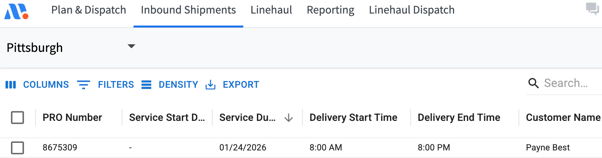
Use this view to:
-
Review shipment details and service windows
-
Filter, sort, and validate records
-
Upload new shipments or update existing ones
-
Prepare shipments for optimization
Key Areas of the Screen
1) Toolbar
- Filter – Narrow results by attributes (e.g., date range, priority, tags).
- Actions – Bulk operations (e.g., edit fields, export, or clear selections).
- Transform – Optional data adjustments (e.g., normalize values before finalizing).
- All / Valid / Invalid – Toggle views to review upload results and fix errors.
2) Table
- Displays one row per shipment.
- Columns show core shipment attributes (see Shipment Attribute Definitions below).
- Click a row to view or edit details (if permitted).
3) Upload & Entry Options
- Upload file – Drag-and-drop a file or select Upload file to import.
- Manually enter data – Add shipments directly to the table when working with small batches or quick fixes.
shipment attribute definitions
| Attribute | Definition |
|---|---|
| PRO Number | Unique shipment ID consisting of a prefix and a sequential numeric identifier. |
| Service Start Date | Earliest allowable service date for the order. |
| Service Due Date | Latest allowable service date for the order. |
| Priority Level | Order priority level (0–4). |
| Customer Name | Name of the customer receiving the shipment. |
| Planning Status | Ready to Plan: shipment is included in routing; Not Ready to Plan: shipment is excluded from routing. |
| Shipment Tags | Tags assigned to the customer location. |
| Day of Week Availability | Days of the week the customer is available for delivery. |
| Delivery Start/End Times | Delivery time window for the customer location. |
| Location Code | Unique customer location identifier. |
| Pieces | Number of units forecasted for delivery. |
| Pallets | Pallet-equivalent count of forecasted units. |
| Weight | Weight of the forecasted shipment. |
| Address | Customer address information. |