.png?width=450&height=117&name=MavenLogo_Horizontal_WhiteType01%20(1).png)
What is Maven Fleet Portal?
The Maven Fleet Portal is a centralized system designed to streamline fleet management operations, including vehicle tracking, maintenance scheduling, driver management, and reporting.
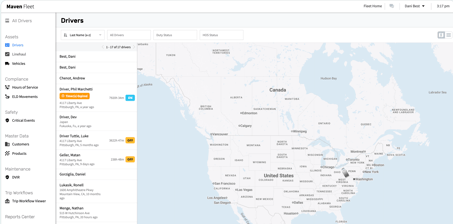
Key benefits:
-
Real-time vehicle tracking and monitoring
-
Automated maintenance scheduling
-
Comprehensive reporting and analytics
-
Driver performance tracking Cost management and optimization
Key Fleet Portal Features
- User Management: Creating, deactivating, and managing driver/manager accounts
- Vehicle Administration: Adding vehicles, assigning vehicle adapters (IOSix or M3), managing vehicle information
- HOS (Hours of Service) Management: Viewing driver logs, performing admin edits, certifying logs, handling violations
- DVIR (Driver Vehicle Inspection Report): Reviewing inspection reports, resolving defects marked by drivers
- Terminal & Group Organization: Setting up operational locations and organizing drivers/vehicles into groups
- ELD Configurations: Choosing rulesets (ELD Standard, Texas 70, etc.), enabling exemptions, setting up company preferences
Who should use this portal?
The Fleet Portal is designed for fleet managers, administrators, drivers, and maintenance personnel
When to Use
Use the Fleet Portal when customers need to manage driver accounts, configure ELD (Electronic Logging Device) settings, set up vehicles, manage terminals/groups, view compliance reports, or adjust fleet-wide settings.
Why It's Important
This is the central hub for fleet administration. Most configuration issues, user management problems, and compliance setup questions will require you to access or guide customers through the Fleet Porta