.png?width=450&height=117&name=MavenLogo_Horizontal_WhiteType01%20(1).png)
Overview
Maven Dispatch acts as the operational control center for pickup and delivery (P&D). The workspace shows routes, drivers, shipments, and exceptions in real time so dispatch can manage the day by exception.
Main areas in Maven Dispatch
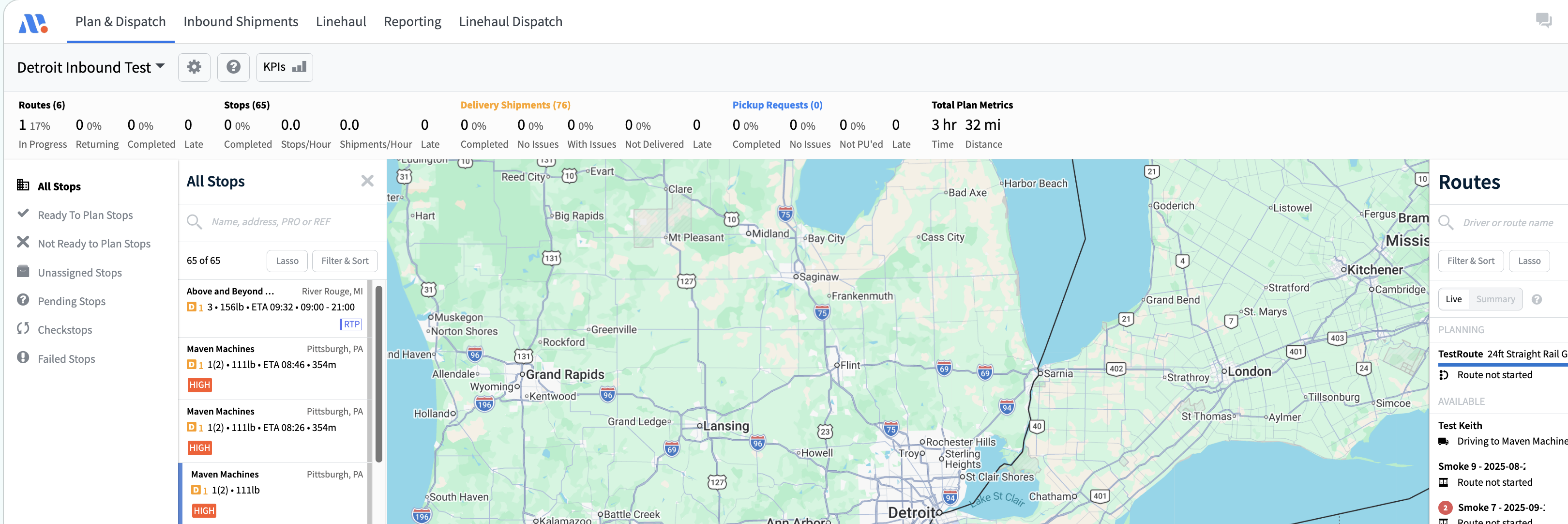
-
Plan & Dispatch page
-
Shows the route list and map.
-
Displays routes, stops, and status for the current service day.
-
-
Route list / board
-
Lists all routes with:
-
Driver and vehicle
-
Status (planned, dispatched, in progress, completed)
-
High‑level KPIs such as stops and miles
-
-
-
Map view
-
Visualizes routes and stops by geography.
-
Highlights active routes and stop status.
-
-
Shipments / inbound view
-
Lists shipments assigned to routes and unassigned shipments (if enabled).
-
Supports filters for customer, tag, planning status, and more.
-