.png?width=450&height=117&name=MavenLogo_Horizontal_WhiteType01%20(1).png)
Table of Contents
Stop visibility filter
The stop selector appears on the left side of the Maven Dispatch screen. It allows planners to quickly narrow down visible stops based on key stop characteristics. When a filter is selected, only matching stops appear on the map and in the stop list.
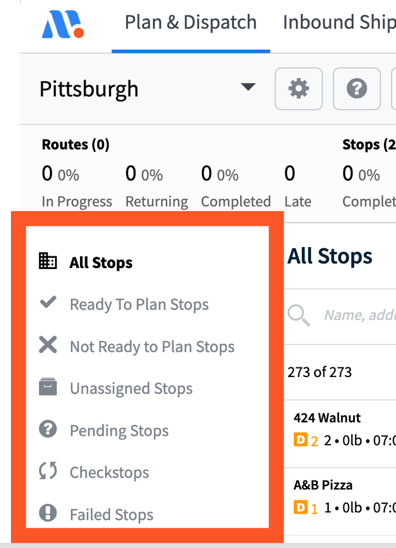
When a filter is selected, only matching stops appear on the map and in the stop list.
| Stop Types | Definition |
|---|---|
| All Stops | Displays all stops currently loaded in Maven. |
| Ready to Plan Stops | Shows stops that have been moved into the Ready to Plan status and can be considered for routing. |
| Not Ready to Plan Stops | Shows stops that have not been moved into Ready to Plan status. |
| Unassigned Stops | Displays any stop not currently assigned or dispatched on a route, regardless of Ready/Not Ready status. |
| Pending Stops | Shows stops on dispatched routes that have not yet been delivered. |
| Checkstops | Not applicable. |
| Failed Stops | Shows stops that were marked as failed by the driver in the Maven Driver App. |
stop list FILTER AND SORT TOOL
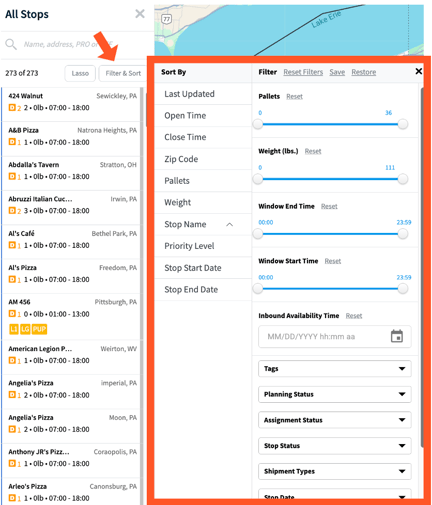
The Filter & Sort tool allows planners to refine stop lists using multiple tags, statuses, and attributes. These filters apply to the stops displayed in the stop list and on the map.
| Filter Category | Definition |
|---|---|
| Shipment Tags | Filters orders based on truck size, location category, and order origin. |
| Planning Status | Filters based on whether stops are Ready to Plan, Not Ready to Plan, or both. |
| Assignment Status | Filters between assigned stops (on routes) and unassigned stops (not yet routed). |
| Stop Status | Filters between successfully delivered stops and those canceled in the Maven App. |
| Shipment Types | Not applicable. |
| Date | Filters stops by service start date or by a specified date range |
stop cards
A Stop Card displays detailed information about a specific order. Planners can open a Stop Card by selecting the stop from the stop list. Each Stop Card provides operational details needed for planning and dispatch.
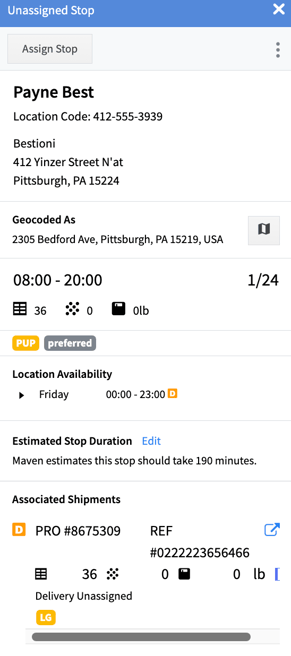
| Geocode | The GPS address for the stop. |
|---|---|
| Order Date Range | The start and due dates associated with the order. |
| Location Availability | The customer’s open/close days and receiving hours. |
| Stop Duration | The estimated time a driver will spend on site, based on historical delivery data. • A manual edit option allows planners to override the estimated service time. • Manual edits can only be applied to unassigned stops and affect only the selected order. |
| Associated Shipments | Additional shipment details, including: – PRO # – Pallets – Pieces – Weight – Priority – Location tags – Order origin |