.png?width=450&height=117&name=MavenLogo_Horizontal_WhiteType01%20(1).png)
Steps
-
Open Fleet Admin and log in.
-
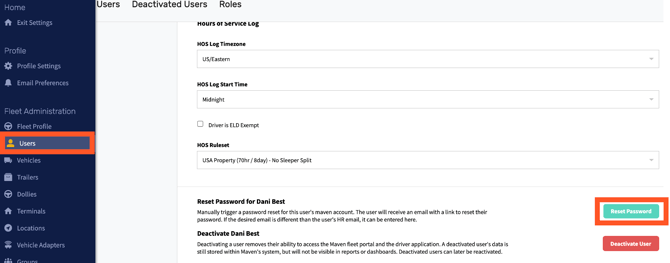
Go to Users.
-
Search for the user who needs a password reset and open their profile.
-
Scroll to the bottom of the page and select Reset Password.
-
In the prompt, enter the email address where the user should receive the reset link.
-
Use an email address the user can access.
-
-
Click Send password reset link.
What happens next
-
The user receives a password reset email at the address entered, provided that:
-
The email address is correct, and
-
The device has an active internet or data connection.
-
Complete the password reset
-
In the email, click Reset Password.
-
A Maven password reset page opens in the browser.
-
If the Maven logo appears zoomed in and the form fields are not visible, zoom out in the browser until the New Password fields appear.
-
-
Enter and confirm the new password.
-
Submit the form and sign back in using the updated password. 1