.png?width=450&height=117&name=MavenLogo_Horizontal_WhiteType01%20(1).png)
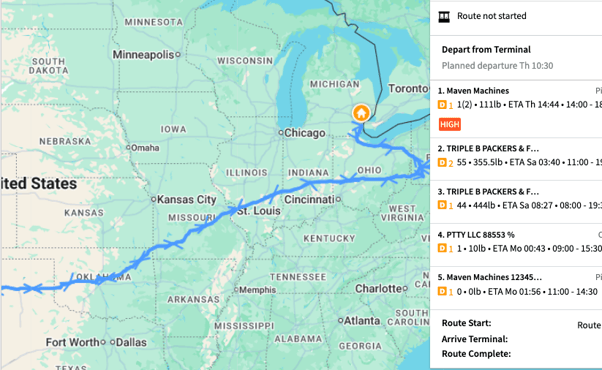
Route polylines are the colored lines you see on the Maven Dispatch map. They show the path a driver is planned to take. Use polylines to quickly understand where a route goesSee polylines on the map
-
Open Maven Dispatch.
-
Switch to the map view.
-
Select a route or driver from the list (if needed).
The map displays a colored line (polyline) that represents that route’s path across all stops.
Understand what the polylines show
A polyline is the route line on the map: a series of connected GPS points (lat/long) that shows the planned or actual path a vehicle takes.
Depending on your configuration, the map can show:
-
Planned route line – the intended path connecting all scheduled stops.
- Look at the line in relation to stop markers to see progress along the route.
Use polylines to make decisions
Use route polylines to:
-
See if the driver is following the planned path or using a different route.
-
Check whether the driver already passed near a location where you want to add a stop.
-
Compare routes in the same area to avoid overlapping coverage or double‑servicing a neighborhood.
-
Decide which driver is best positioned to handle an exception or recovery stop.
Always confirm HOS, remaining stops, and customer windows before assigning extra work, even when the polyline looks convenient.
Troubleshoot when polylines don’t look right
If a route line looks wrong or is missing:
-
Confirm you selected the correct route/date and cleared restrictive filters.
-
Zoom out on the map to be sure the polyline is not off‑screen.
-
Check that the route has valid stops and locations (no bad or missing geocodes).
-
If driven paths are missing, confirm that:
-
The VDA/device is online and sending GPS data.
-
The driver is actually running that route in the mobile app.
-
If polylines still appear incorrect across many routes, capture screenshots and escalate to support with route IDs and timestamps.
-
Uses historical traffic patterns to improve live ETAs
-
Incorporates historical weather impacts on travel time
-
Provides truck‑aware navigation that avoids low bridges and restricted roads