.png?width=450&height=117&name=MavenLogo_Horizontal_WhiteType01%20(1).png)
Duty statuses
-
Off Duty (OFF) – driver is not working and not responsible for performing driving-related tasks.
-
Sleeper Berth (SB) – driver is in the sleeper berth and off duty for HOS purposes.
-
Driving (D) – vehicle is in motion and time counts against the driver’s driving limit.
-
On Duty, Not Driving (ON) – driver is working but not driving (for example, inspections, loading/unloading, paperwork).
-
Yard Move (YM) – special driving category for controlled yard or terminal movements; counts as on-duty, not driving.
-
Personal Conveyance (PC) – off-duty driving for personal use that does not advance the commercial business.
Where duty statuses appear in the portal
|
Location |
What appears |
|---|---|
|
HOS Dashboard |
Current duty status for each driver, with hours remaining and any active violation flags. |
|
Driver Log View |
Full history of duty status changes with timestamps, locations, and annotations for each event. |
Duty statuses in the Driver Log View
Open the Driver Log View from the HOS dashboard by selecting a driver and a specific log date.
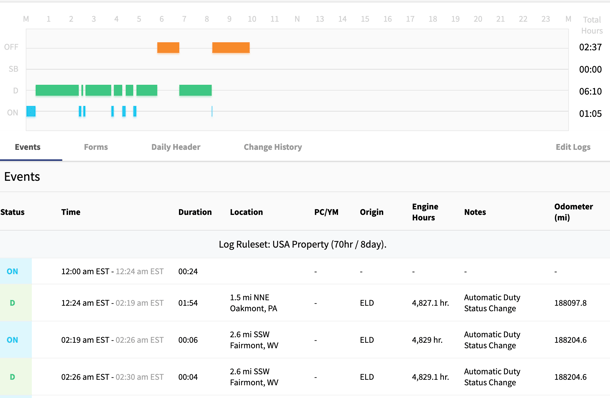
Each log shows:
-
Every duty status event (OFF, SB, D, ON, YM, PC).
-
Start time, end time, and duration for each event.
-
Location recorded for each status change.
-
Any annotations added by drivers or portal users to explain events or corrections.
Require clear annotations for unusual events (for example, roadside inspections, breakdowns, extended delays at shippers/receivers).
tips
-
Enforce correct use of PC and YM to avoid misclassified drive time and potential violations.
-
Use the Driver Log View when investigating violations, complaints, or audit questions to confirm how duty statuses were applied and documented.