.png?width=450&height=117&name=MavenLogo_Horizontal_WhiteType01%20(1).png)
Vehicle page
Use the Vehicle page to see the driver’s current vehicle and its live location.
-
Go to
https://manager.mavenmachines.com. -
Open the Vehicle view for the truck
Use this page to:
-
Track the vehicle on the map in near real time.
-
See basic information about the current driver/vehicle pairing (driver, asset, and status).
Vehicle History (polylines and breadcrumbs)
The Vehicle History page shows where the vehicle has traveled over a selected time period.
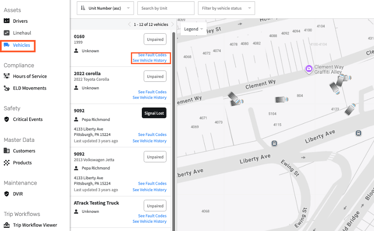
Access Vehicle History
- In Maven Fleet, select Vehicles under Assets.
- Choose the desired vehicle.
- Select See Vehicle History.
Use the Vehicle History Page to
- Display the vehicle’s route line (polyline) for the selected date and time range.
- View breadcrumb points representing individual GPS pings.
- Review driving history, mileage, and the path taken for the selected period.
- Investigate a past trip, confirm a stop or location visit, or analyze routing behavior between stops.
How the VDA creates breadcrumbs
The Vehicle Data Adapter (VDA) sends location pings to Maven Fleet on a continuous schedule:
- While moving: The VDA sends frequent pings, creating a detailed breadcrumb trail.
- While parked: The VDA checks in approximately once per hour to maintain an accurate record without generating unnecessary data.
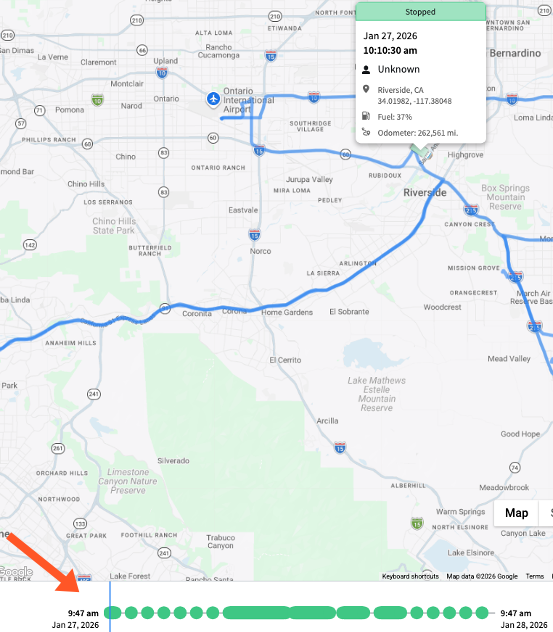
These pings generate the polylines and breadcrumb points displayed on the Vehicle History map.