.png?width=450&height=117&name=MavenLogo_Horizontal_WhiteType01%20(1).png)
Overview
Maven Dispatch supports fast review and adjustment of daily routes so work can be balanced across drivers.
Core actions include:
-
Viewing route details
-
Adjusting stops and assignments
-
Comparing routes to rebalance workload
View routes
-
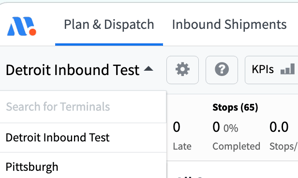
Open Maven Dispatch and select the terminal
-
Locate the driver or route on the Dispatch board.
-
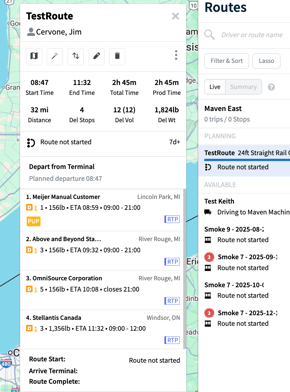
Select a route, each route contains the following:
-
Stop list and sequence
-
Planned times and windows (if configured)
-
Summary metrics such as total stops, distance, or duration
-
Adjust routes and stops
Use route adjustments to fix assignments or rebalance work.
Typical actions:
-
Drag a stop to a different position within the same route.
-
Drag a stop to another driver’s route (if enabled).
-
Move an entire route to a different driver or vehicle.
After changes, check updated route metrics (stops, distance, duration, timing) to confirm the adjustment meets operational goals.
Compare routes
Compare routes to spot imbalance and inefficiency:
-
Display multiple drivers’ routes for the same date.
-
Review each route’s:
-
Number of stops
-
Distance and/or duration
-
General geography and territory
-
-
Identify overloaded or underutilized routes.
-
Shift individual stops or segments between routes until workloads appear balanced.
Tips
-
Review all routes at the start of the day for balance.
-
Limit mid-day changes to those needed for service or exceptions.
-
After significant edits, confirm that driver routes update as expected.