.png?width=450&height=117&name=MavenLogo_Horizontal_WhiteType01%20(1).png)
Service Desk supports fast answers to common questions:
-
Where is the shipment right now?
-
When did pickup occur?
-
When will delivery occur?
-
Who are the shipper and consignee contacts?
What Maven Service Desk Shows
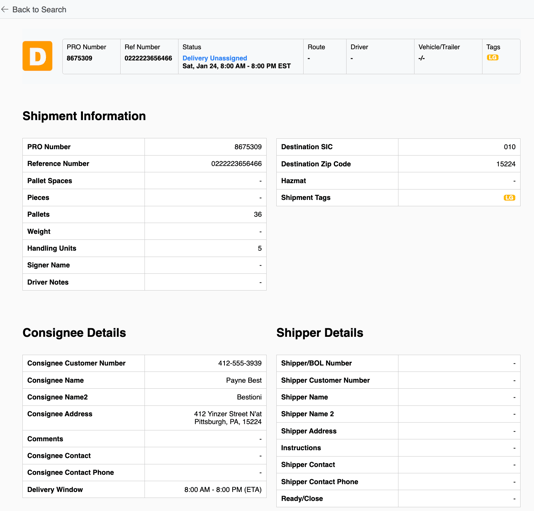
Opening a shipment in Service Desk displays a complete snapshot:
Shipment Details
-
PRO or reference number
-
Current status
-
Key dates and milestones
Shipper Information
-
Company name
-
Address
-
Contact details
Consignee Information
-
Delivery name and address
-
Contact details
Pickup & Delivery Details
-
Pickup location and time
-
Delivery location and time
-
Special instructions and notes
Route Progress
-
Network movement and milestones
-
Latest status updates
Service Desk remains view-only. The portal displays shipment information but does not allow data edits.
How to Access Maven Service Desk
Two access paths open Maven Service Desk.
Option 1: Access the Service Desk Website Directly
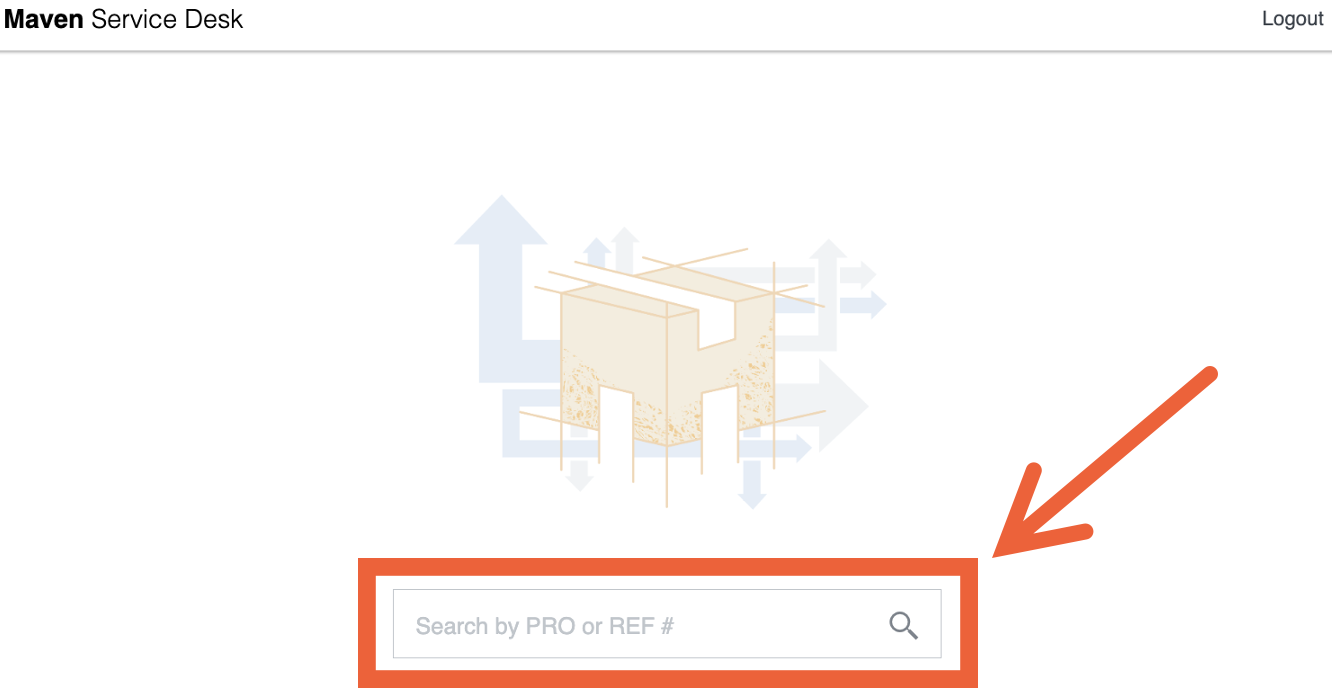
This option supports starting with a shipment search.
-
Open a web browser.
-
Navigate to: servicedesk.mavenmachines.com
-
On the Service Desk search screen, enter:
-
a PRO number, or
-
a reference number
-
-
Select the shipment from the results.
Service Desk opens the full shipment details page.
Option 2: Open Service Desk from Within Maven (Plan & Dispatch)
This option supports users already working with routes and stops in Maven.
-
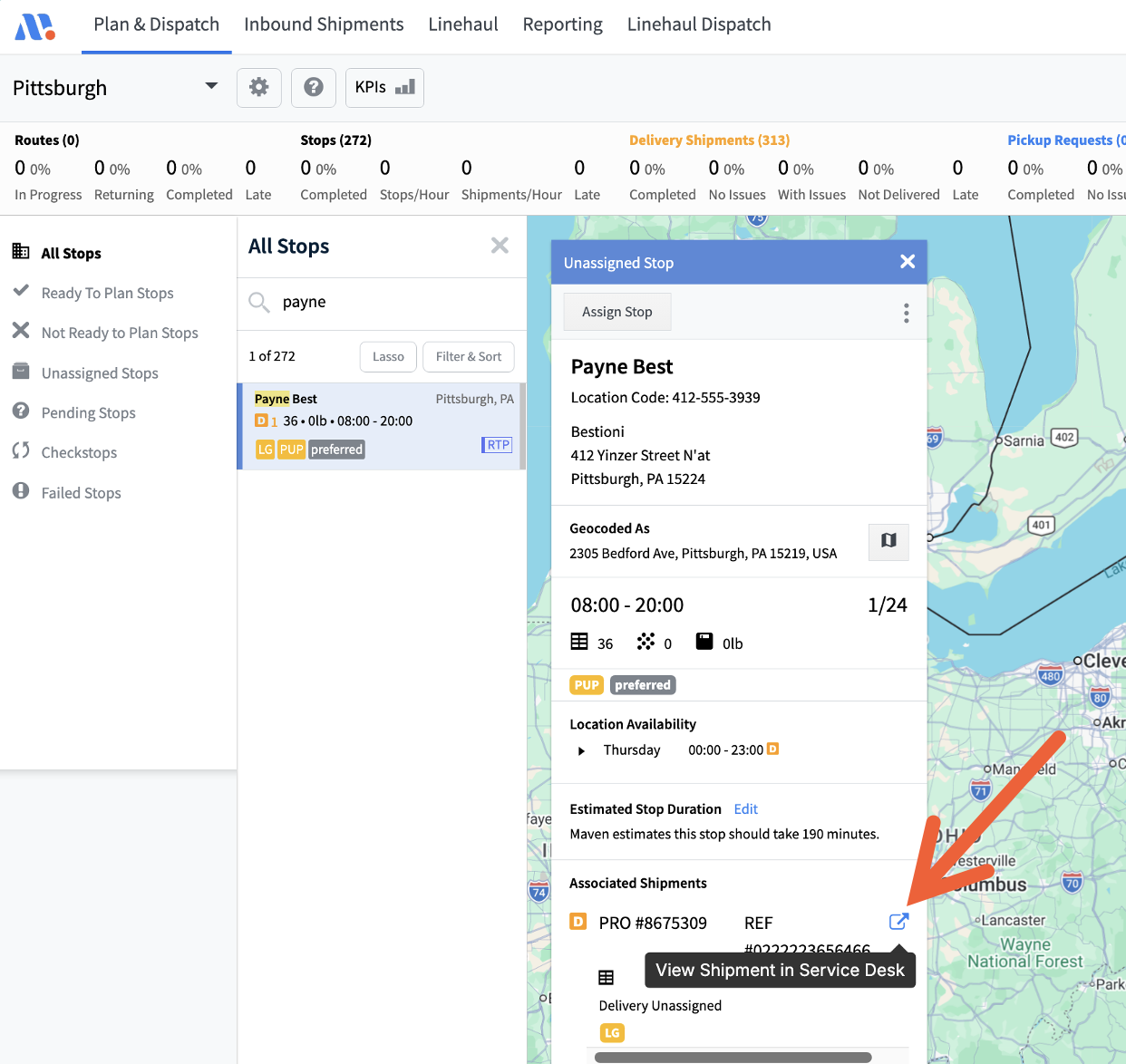
Open the Plan & Dispatch tab in Maven.
-
Locate the route and select the PRO / reference number on the stop outline.
-
Scroll to Associated Shipments in the stop details.
-
Select “View shipment in service desk” (may display with an alert icon).
Service Desk opens in a new browser tab with the shipment details.
What Maven Service Desk Supports
Service Desk enables review of:
-
Correct shipment confirmation through PRO/reference, status, and dates
-
Shipping and receiving parties:
-
shipper and consignee names
-
addresses
-
contact information
-
-
Pickup and delivery information:
-
locations
-
time windows and key timing
-
stop notes and instructions
-
-
Third-party and route context
Teams use this information to answer:
-
“Where is the freight right now?”
-
“What are the pickup and delivery details?”
-
“Who is listed as the shipper or consignee?”
Searching for Another Shipment
To locate a different shipment:
-
Select Go Back to Search in Service Desk.
-
Enter the new PRO or reference number.
-
Choose the shipment from the results.
The page refreshes with the selected shipment’s details.
Who Uses Service Desk?
Service Desk supports:
-
Customers tracking freight
-
Customer service teams answering status questions
-
Shipping and receiving teams confirming deliveries
-
Logistics partners reviewing shipment details
Common Questions
Does Service Desk show real-time updates?
Service Desk displays the most recent information available from the network.
Can delivery details change in Service Desk?
No. Service Desk displays data only. Change requests require contact with the carrier or support team.
What happens if a shipment does not appear?
Confirm the PRO or reference number. If the shipment still does not appear, contact support.